Earlier this year, the new Napster was given a bit of a fright when reports began circulating that its recently introduced subscription service had been “hacked.” Those reports stung Napster in two ways.
They suggested that the service, which in its original incarnation was shut down by the music industry as a rat’s nest for tune nicksters, had, however inadvertently, returned to its old ways. And they appeared just as the service was trying to gain some positive traction in the minds of consumers as well as record executives for its Napster To Go subscription model.
Napster To Go allows its subscribers to listen, download and transfer to portable players all the music they want for a monthly fee. If a subscription lapses, then access is automatically blocked to any tracks obtained from the service. Essentially, instead of owners of music, listeners become renters of music.
Stream Ripping
To add to the company’s embarrassment, further reports maintained that Apple CEO Steve Jobs, an outspoken critic of the rental music model, had been spreading the word about Napster’s woes to entertainment bigwigs via e-mail.
What’s ironic is that the so-called hack wasn’t a hack at all. Napster’s protection scheme, designed by Microsoft, hadn’t been hacked and was doing what it was supposed to do.
Enterprising users were using a plug-in, or small program, for the Winamp media player distributed by America Online to record sound through a computer’s sound card, a process known as “stream ripping.”
Since stream ripping records from a computer’s sound card, any software that uses that card — which includes players like those used by Apple, MusicMatch and Microsoft — can have its content snatched by the process. The tradeoff is that the sound quality of ripped files isn’t as good as a track purchased at an online music store.
Stream ripping — which has some perfectly legitimate uses, such as converting analog sound sources like old LPs into digital files — has been around for some time. And there are better ways to do it than using Winamp. That’s because the Winamp plug-in captures sound and writes it to disk in WAV format. WAV files are very large so they are often converted to the wieldier MP3 format.
Quirky Apps
You can avoid the intermediate step of converting captured sound from WAV to MP3 with a number of shareware programs that can be found on the Internet. One of my favorites is All Sound Recorder, which can be found at Allformp3.com.
However, All Sound Recorder can be quirky. It can cause applications using a computer’s sound card to “hang,” including All Sound Editor, which is included with the program’s US$29.95 selling price.
All Sound Recorder also has an unconventional interface that can take some getting used to.
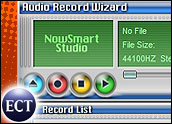
A much cleaner approach to recording from a sound card is embodied in Audio Record Wizard, recently released in version 3.98 by NowSmart Software Studio.
Intuitive System
While the application, which sells for $24.95, doesn’t have a classic Windows interface, it’s still very intuitive to use. Large 3D buttons below an information window let you start a new file, record or pause recording, stop recording and play what you’ve recorded. The buttons aren’t labeled, but are marked with conventional symbols for their functions, and text labels will pop up when your cursor hovers over a button.
Beside those buttons are controls for scheduling recordings, toggling the display and hiding of a window listing your recordings and popping up a menu of options.
From the options menu you can choose your recording device — line in, CD audio, mic volume and such; set your recording volume level and quality; limit the length of audio files; determine the parameters of MP3 or OGG files saved by the program; and create hot keys for the application’s functions.
Unlike All Sound Recorder, Audio Record Wizard plays well with other programs and won’t cause them to hang. If you need to capture sound from your sound card, this NowSmart offering is a hassle-free way to do it.
John Mello is a freelance business and technology writer who can be reached at [email protected].
 Read More Reviews…












 Loading ...