Business users whose lives revolve around their mobile phones won't be disappointed with Samsung's Intrepid smartphone. The handset, which uses Sprint's 3G network (EV-DO Rev.A) domestically and also connects to 3G networks abroad, is packed with features aimed at the pinstripe crowd.
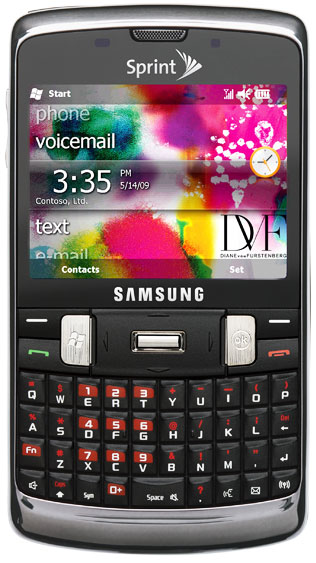
Intrepid (US$149.99, excluding taxes, with two-year service agreements, $50 instant savings and $100 mail-in rebate) runs under the latest version of Microsoft's cellphone operating system, Windows Mobile 6.5 Professional.
One improvement in this edition of Windows Mobile is a customizable Today screen. It displays frequently used features, the arrival of new text and email messages, missed calls and calendar appointments. You can also dial calls from the keyboard when that screen is displayed. Typing numbers from the keyboard ordinarily requires the use of the "Fn" key. That would make keyboard dialing very awkward. In Today mode, though, numbers can be dialed without using Fn.
Built for Road Warriors
Intrepid is designed for power-hungry business users. It has Microsoft Office Mobile for editing Word and Excel files and viewing PowerPoint presentations. Email is handled through Windows Mobile email. Other features include stereo Bluetooth and WiFi, microSD card support and easy access to social networking sites like Facebook, Flickr and Twitter, as well as instant messaging and threaded text messaging.
The unit is a one-piece mobile phone along the lines of the Palm Pixi or Treo Pro.
On the unit's front is a Qwerty keyboard and 2.5-inch display. Between the keyboard and display are controls for starting and ending calls, accessing the Windows Mobile operating system, navigating around the screen and giving the OK to perform a function. In addition, there are two "soft" keys which change function from task to task.
Comfortable Keyboard
The phone's 320-by-240 pixel display is sharp and bright, but text in smaller fonts is difficult to read. Items displayed in the screen can be manipulated via touch or a telescoping stylus that is conveniently stored in the side of the phone. The addition of the stylus is a necessary one since some of the icons on the screen are so small, poking them with a finger can very difficult. Generally, the display is responsive to tapping by digit or stylus -- although less so compared to something like an iPhone or iPod touch -- but from time to time multiple jabs are necessary.
The Qwerty keyboard is comfortable to use for thumb typists. Because the keys are rounded slightly, they can be securely pressed without accidentally hitting an adjacent key. Some of the keys do double duty on the keyboard. These secondary functions appear as red characters above the Qwerty ones and can be accessed via an Fn key. The typography for the secondary characters is very small and largely difficult to see.
Designed for Convenient Use
On the left side of the Intrepid is the volume control and charger. On the right side of the unit are the power and camera buttons and the compartment for the stylus. At the back of the unit is the lens for its 3.2-megapixel camera, a speaker and a reflective button. The button can be used to frame self-portraits or arms-length shots. On top of the phone is a jack for a headphones.
As sophisticated as the Intrepid is, it's designed for convenient use. Need to make a call? Press the green talk button. A telephone keypad pops up on the screen. You can start poking in numbers or use screen icons to access your address book or a log of recent calls. If you start punching in numbers, as you do so, the phone automatically checks the address book and call logs for the digits and dynamically displays corresponding matches on the screen. This technique greatly speeds up the process of making a call.
When you've found the number you're looking for, you can poke an onscreen send button to make your connection. Once connected, more buttons appear that allow you to turn your speaker on or off, access your call log, make a note about the call or mute the phone. The speaker button is especially opportune because it eliminates the need to hunt for the speaker control when you're making a call.
Office in a Pocket
Both still images and video can be captured with the Intrepid. Its 3.2 megapixel still camera produces images in four sizes from 640-by-480 to 3,048-by-1,536 pixels and has a number of advanced features for a phone cam. For instance, shots can be over- or under-exposed with exposure compensation. Multiple images can be garnered rapidly in continuous capture mode. It even has smile recognition, where the camera won't fire its shutter until it detects the subject smiling.
The phone's video camera also has exposure compensation. It has three video qualities -- high, normal and economy -- in two sizes (320-by-240 and 176-by-144 pixels) as well as a variety of white balance settings (auto, tungsten, fluorescent, daylight and cloudy), metering choices (center weighted, spot and matrix) and special effects (black and white, sepia, aqua and negative).
The Samsung Intrepid is stuffed with features that enable a businessperson to carry around an office in her or her pocket. However, although the latest version of Microsoft Mobile is improved over previous editions, it still lacks the intuitiveness of its newer competitors. It feels like a desktop operating system downsized uncomfortably to run on a small screen. That kind of compromise, however, may be irrelevant to Windows shops looking for some robust hardware that gives their users a familiar interface on both their big and little screen devices.











 Loading ...